Gardener certification manager
Warning
This documentation is using legacy Gardener Dashboard, you can find documentation with OSC dasbhoard on this link.
The cert-manager controller is usually used to manage TLS certificates in Kubernetes clusters.
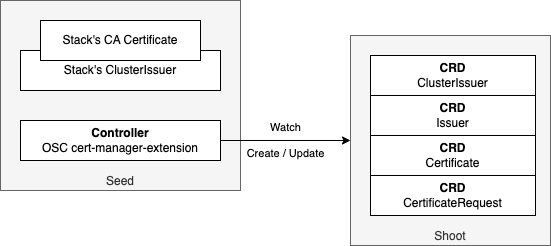
In a multi-cluster environment like Gardener, it becomes cumbersome to use existing open source projects, such as cert-manager, for managing the certificates. Therefore OSC provides an extension for the Shoots, which allows the usage of cert-manager's CRDs without the need to install and configure cert-manager itself.
Warning
The cert-manager provided by OSC project uses a different approach compared to the Gardener project' cert-manager. The OSC implementation uses the standard cert-manager implementation deployed as a Gardener Extension.
Deploying the extension
Warning
It is not supported to deploy the upstream cert-manager to a Shoot cluster where the extension is enabled.
Such setup won't function correctly, and the issues will remain even after removing one of the cert-managers. Please either enable the extension or deploy your own cert-manager, never both.
The extension is activated for a Shoot by defining it in its
manifest in the extensions section.
This can be done either at the Shoot's creation,
or later, by editing and re-applying an existing Shoot's manifest.
The extension is deployed when the Shoot is reconciled.
apiVersion: core.gardener.cloud/v1beta1
kind: Shoot
metadata:
  name: <name of the shoot>
  namespace: garden-<name of the project where shoot needs to be located>
spec:
  extensions:
    # enable the cert-manager extension
    - type: osc-cert-manager-service
To change it through the Gardener dashboard, click on the YAML section on the Shoot's status page, and edit the manifest:
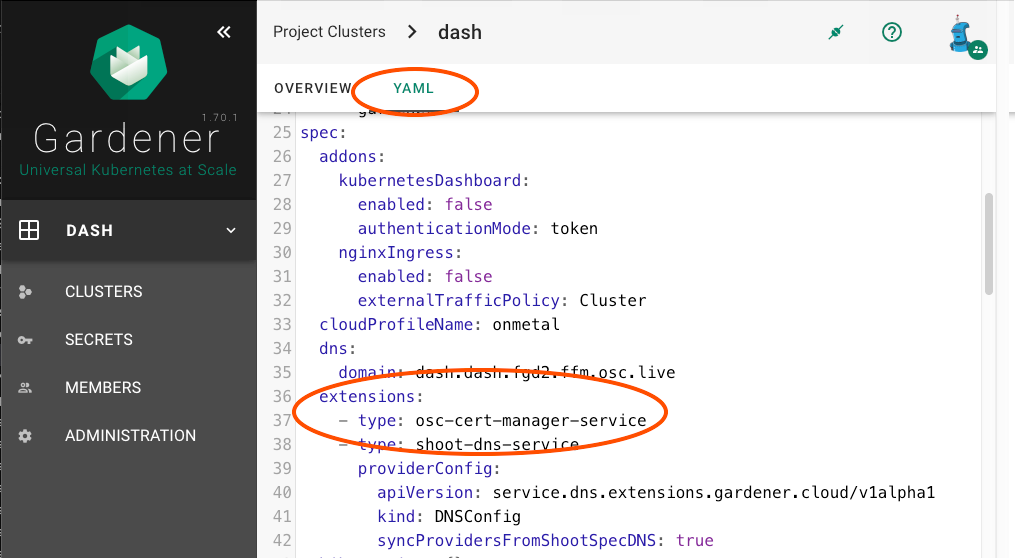
The Shoot will be reconciled after pressing the SAVE button on the bottom of page.
Disabling the extension
The extension can be explicitly disabled, which may be needed in case the cert-manager extension is globally enabled.
kind: Shoot
spec:
  extensions:
  - type: osc-cert-manager-service
    disabled: true
Enabling Gateway API integration
The Gateway API integration for the cert-manager extension is disabled by default. It allows you to automate certificate provisioning for Gateway API resources on a Shoot cluster if enabled. It is suggested to migrate from Ingress Nginx to Gateway API in Shoot clusters.
Warning
The customer is responsible for creating and maintaining the CRDs for the Gateway API and its Gateway API controller on the Shoot cluster.
If this feature is not needed, it is possible to disable it in the Shoot manifest.
kind: Shoot
spec:
  extensions:
    - type: osc-cert-manager-service
      providerConfig:
        apiVersion: cert-manager.osc.extensions.gardener.cloud/v1alpha1
        kind: CertConfig
        enableGatewayAPI: true
Usage
The cert-manager Custom Resource Definitions (CRDs) are available on the Shoot clusters. The CRDs have the same definition as those of the upstream cert-manager's.
Users can use the extension with their own Certification Authority (CA) certificate. This has to be uploaded to the Shoot as a Secret, and referenced in the Issuer object.
Each Gardener stack has a self-signed CA certificate,
available to all Shoots of the stack.
To create certificates issued by the predefined extension-provided
ClusterIssuer, define the issuerRef in the following way:
 issuerRef:
    group: cert-manager.osc.extensions.gardener.cloud
    kind: ClusterIssuer
    name: Gardener
  secretName: ca-cert-inbuild
If needed, users can create an Issuer which will generate certificates issued by ACME based certificate authority.
Warning
It is not possible to use a user-defined ClusterIssuer with the cert-manager extension. Use Issuer instead.
Example: Generating Ingress certificate by annotation
This example shows how to deploy a cert-manager Issuer and use it to issue an Ingress certificate by annotating the Ingress. The predefined stack CA certificate will be used as the issuing certificate. All actions are performed directly on Shoot cluster.
- Option 1: obtain a certificate secret using the OSC provided ClusterIssuer
apiVersion: cert-manager.io/v1
kind: Certificate
metadata:
  name: ca-cert
  namespace: my-namespace
spec:
  isCA: true
  dnsNames:
    - somedomain.example.com
  issuerRef:
    group: cert-manager.osc.extensions.gardener.cloud
    kind: ClusterIssuer
    name: Gardener
  secretName: ca-cert
- Option 2: deploy a Secret with a custom certificate/private key pair
apiVersion: v1
kind: Secret
metadata:
  name: ca-cert
  namespace: my-namespace
type: kubernetes.io/tls
data:
  tls.crt: <Base-64 encoded PEM of the certificate>
  tls.key: <Base-64 encoded PEM of the private key>
In both cases a Secret named
ca-certwill be present, containing the certificate/key pair.
- The next step is to create an Issuer in the same Namespace,
referencing the Secret.
apiVersion: cert-manager.io/v1
kind: Issuer
metadata:
  name: gardener-issuer
  namespace: my-namespace
spec:
  ca:
    secretName: ca-cert
-
When an Ingress is created with the correct annotation and TLS section, the cert-manager extension will create a new certificate/key pair for the Ingress, based on the Issuer and the
ca-certfrom the previous step. Let's consider that we already have:- a service
my-servicein the my-namespace namespace - a deployed nginx-ingress-controller
- a DNS record
*.example.comin the DNS provider extension connected to the ingress controller's public IP.
apiVersion: networking.k8s.io/v1
kind: Ingress
metadata:
  name: my-ingress-name
  namespace: my-namespace
  annotations:
    cert-manager.io/issuer: gardener-issuer
spec:
  ingressClassName: nginx
  rules:
  - host: ingresstest.example.com
    http:
      paths:
      - pathType: Prefix
        path: "/"
        backend:
          service:
            name: my-service
            port:
              number: 8080
  # placing a host in the TLS config will determine what ends up
  # in the cert's subjectAltNames
  tls:
  - hosts:
    - ingresstest.example.com
    secretName: my-ingress-name-cert
The following objects are created on the cluster:
kubectl get ingress -n my-namespace
NAME              CLASS   HOSTS                         ADDRESS        PORTS     AGE
my-ingress-name   nginx   ingresstest.somedomain.live   80.158.33.50   80, 443   47s
kubectl get certificate -n my-namespace NAME READY SECRET AGE my-ingress-name-cert True my-ingress-name-cert 55skubectl get secret/my-ingress-name-cert -n my-namespace NAME TYPE DATA AGE my-ingress-name-cert kubernetes.io/tls 3 87s - a service
Example: Using with ACME
This example shows how to use cert-manager with ACME to obtain certificates. The ACME plugin is included in the cert-manager extension.
Note
Be aware:
- the number of certificates issued for a domain may be limited by your chosen ACME provider.
- if
*osc.livedomain is used, the quota may be shared across the entire platform and multiple customers. As such, limits imposed by some providers can be reached sooner than expected.
- Create a new ACME based
Issuer:apiVersion: cert-manager.io/v1 kind: Issuer metadata: name: my-issuer-name namespace: my-namespace spec: acme: server: https://acme-server email: some.mail@mailprovider.com privateKeySecretRef: name: my-secret-name solvers: - http01: ingress: class: my-ingress-classThe ACME plugin can contain more solvers (methods to confirm the owner of the domain). For demonstration purposes the http solver is used.
- Create the Ingress with new Issuer:
apiVersion: networking.k8s.io/v1
kind: Ingress
metadata:
  name: my-ingress-name
  namespace: my-namespace
  annotations:
    cert-manager.io/issuer: my-issuer-name
    acme.cert-manager.io/http01-edit-in-place: "true"
spec:
  ingressClassName: nginx
  rules:
  - host: ingresstest.example.com
    http:
      paths:
      - pathType: Prefix
        path: "/"
        backend:
          service:
            name: my-service
            port:
              number: 8080
  # placing a host in the TLS config will determine what ends up
  # in the cert's subjectAltNames
  tls:
  - hosts:
    - ingresstest.example.com
    secretName: my-ingress-name-cert
- In addition to the Ingress, a Certificate and 2 Secrets are created
(one containing the private key for certificate
and one with the TLS certificate):
kubectl get ingress -n my-namespace
NAME              CLASS   HOSTS                         ADDRESS       PORTS     AGE
my-ingress-name   nginx   ingresstest.somedomain.live   80.158.33.50  80, 443   47s
kubectl get secret my-ingress-name-cert -n my-namespace NAME TYPE DATA AGE my-ingress-name-cert kubernetes.io/tls 2 7m32s