Project resource on garden cluster
Note
If you want to use legacy Gardener Dashboard please refer to this documentation.
Projects
The Project resource is used for data isolation between individual Gardener consumers. Each team (or customer) has its own Project to manage its own Shoot clusters. Each Project is backed by a Kubernetes Namespace that contains the actual related Kubernetes resources, like Secrets or Shoots. The Project resource supports RBAC within the namespace with predefined roles.
Project and Shoot name length limitation with an Ingress controller
If you plan to use an Ingress controller — the OSC provided one or your own — you need to take into account the length limit for the Project and Shoot names.
Infrastructure Credentials
Infrastructure credentials required to deploy Shoot clusters are automatically provisioned in each project after the project is created. There is no need to create them manually.
During the creation of a Shoot cluster, the credential needs to be selected.
This can be done using the Shoot creation form,
using the drop-down in the section "Infrastructure details".
In the YAML manifest the field spec.credentialsBindingName will contain this information.
Member management
Member management within Projects is done via the .spec.members[] field in the Project resource.
Users and groups can be assigned either during Project creation or added additionally.
Project members
The list of members (.spec.members[]) contains all the people and groups that are associated with the project in any way.
Each project member must have at least one role, additional roles can be added to .spec.members[].roles[].
The following roles are defined:
admin-
This allows to fully manage resources inside the project (e.g., Secrets, Shoots, ConfigMaps). Mind that the admin role has
read onlyaccess to service accounts. serviceaccountmanager-
This allows to fully manage service accounts and their request tokens in the Project namespace. The permissions of the created service accounts are instead managed by the admin role.
uam-
This allows to add/modify/remove human users or groups to/from the project member list.
viewer-
This allows to read all resources inside the project except secrets.
owner-
This combines the
admin,uam, andserviceaccountmanagerroles.
Adding users and groups during Project creation
Apply the following manifest against the Garden cluster with kubectl apply -f <filename>.yaml.
The example below shows how to create a project with both individual users and groups as members:
apiVersion: core.gardener.cloud/v1beta1
kind: Project
metadata:
  name: dev
spec:
  namespace: garden-dev
  description: "This is my first project" # optional
  purpose: "Experimenting with Gardener" # optional
  owner:
    apiGroup: rbac.authorization.k8s.io
    kind: User
    name: oidc:john.doe
  members:
    - apiGroup: rbac.authorization.k8s.io
      kind: User
      name: oidc:adam.doe
      role: admin
    - apiGroup: rbac.authorization.k8s.io
      kind: Group
      name: oidc:gardener:gardener-developers
      role: admin
Using groups for team management
Groups are particularly useful for managing access for entire teams or departments. Instead of adding individual users, you can add a group that contains all team members, making it easier to manage permissions at scale.
Adding users and groups after Project creation
Using kubectl
Use kubectl edit project <projectName> -n garden-<projectName> and add the new users and groups to .spec.members[].
spec:
  ...
  members:
  - apiGroup: rbac.authorization.k8s.io
    kind: User
    name: oidc:john.doe
    role: admin
  - apiGroup: rbac.authorization.k8s.io
    kind: Group
    name: oidc:gardener:gardener-developers
    role: admin
Using the OSC dashboard
Log in to the OSC dashboard, navigate to a Project, and then click the Members option under the Settings menu on the right side of the navigation bar.
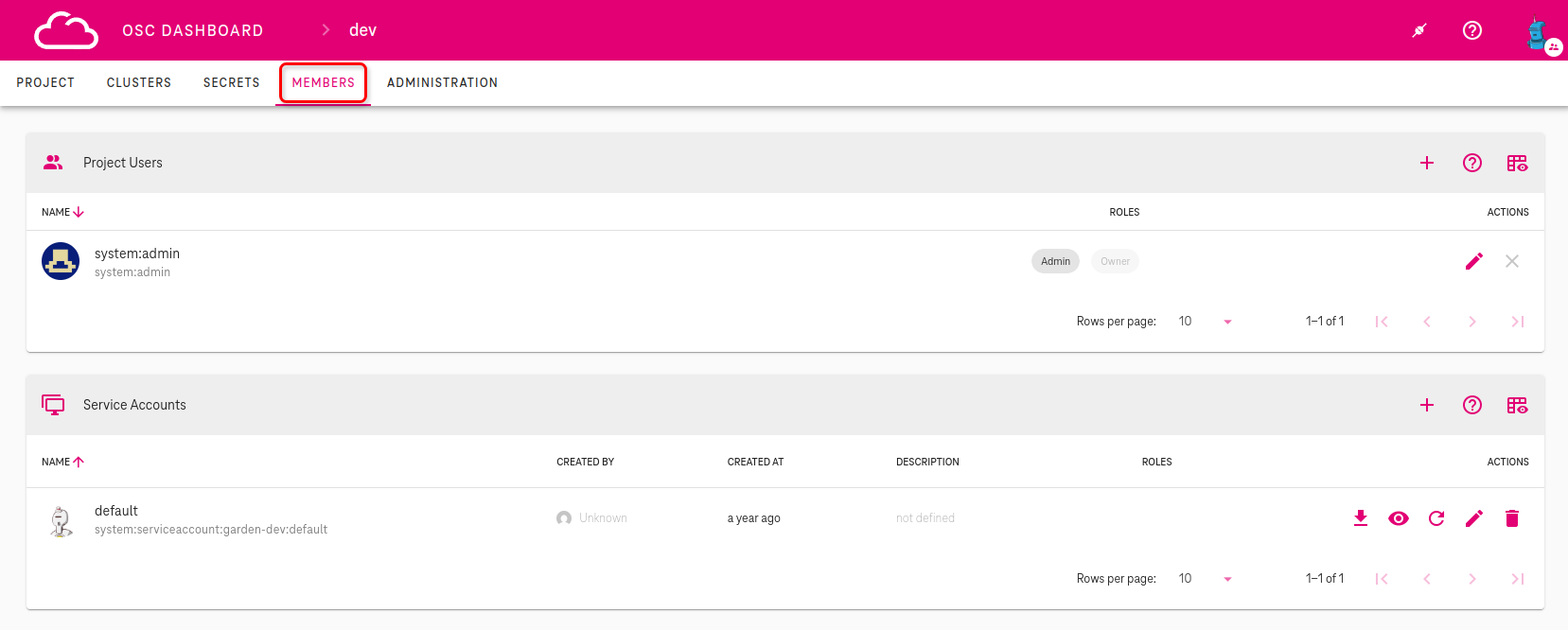
You will be redirected to the members administration section. All groups, users, and service accounts are displayed with their Project assignment and respective roles. Within this section, you can manage groups, users and service accounts within the Project.
Adding groups
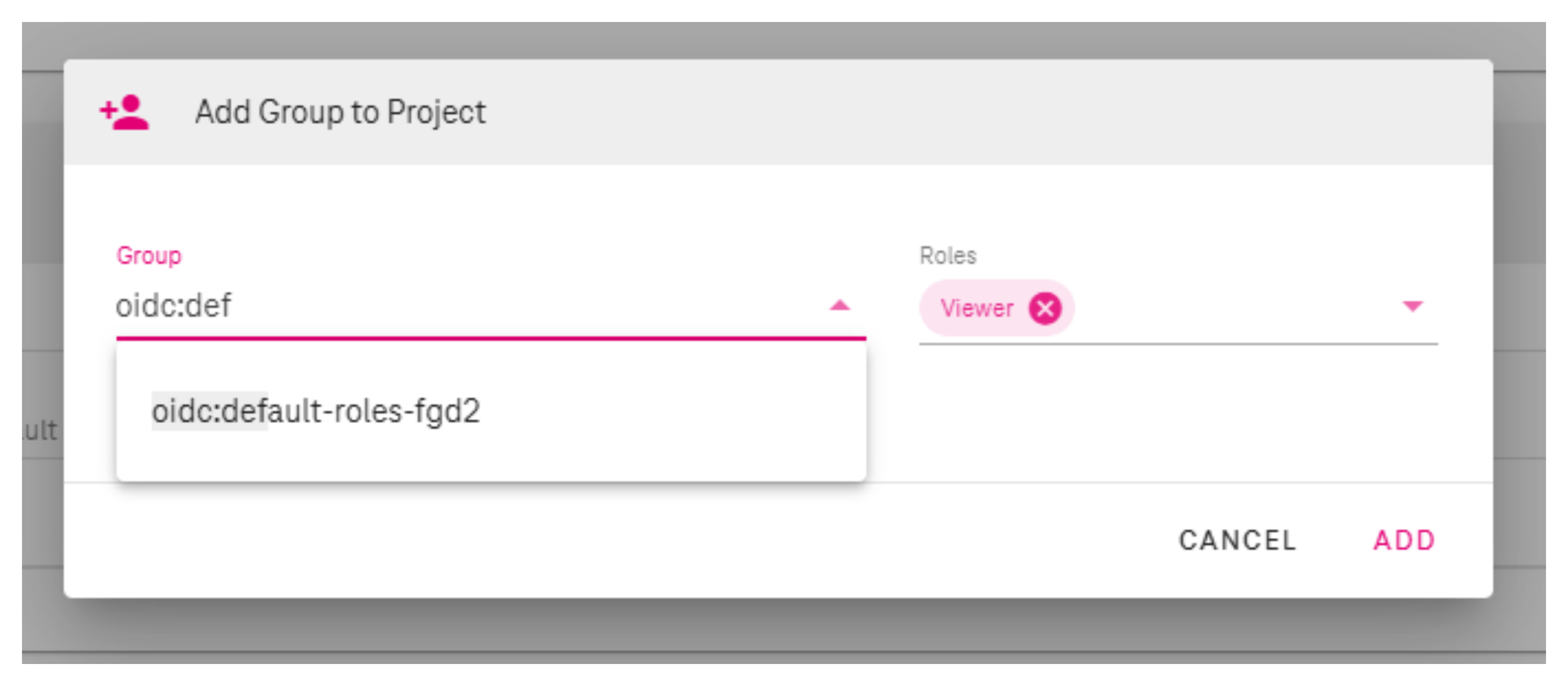
Click on the plus (+) icon in the Groups section to add a new group to the project.

The group selection field provides autocomplete functionality showing groups from your user profile. Start typing to see suggestions from groups you belong to, or manually enter any group name.
Group autocomplete and manual entry
The autocomplete feature displays groups that are currently assigned to your user account to help with quick selection. However, you can manually type and add any group name, not just the ones shown in the autocomplete list.
Group names are prefixed with oidc: to identify groups from the identity provider
(e.g., oidc:project-developers).
Adding users
Click on the plus (+) icon in the Users section to add a new user to the project.

Adding service accounts
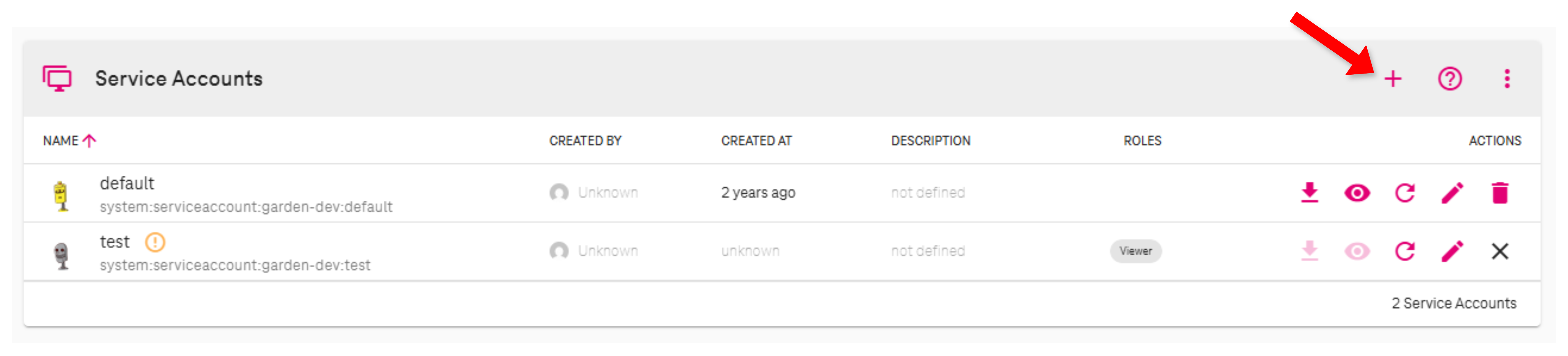
Click on the plus (+) icon in the Service Accounts section to add a new service account to the project.
Managing roles
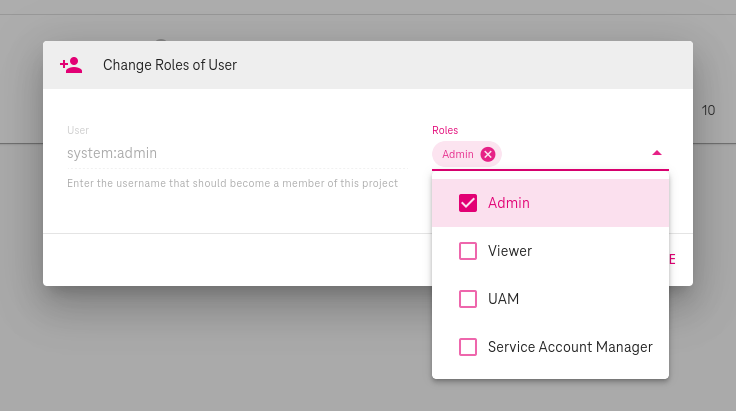
Click on the pencil icon to edit a user, group, or service account within the project.

Once you click on the pencil icon, you will be redirected to the management section, where you can assign or remove roles from users, groups, or service accounts. You can assign multiple roles to members, based on the specific permissions they should have within the project.
Removing members
To remove a user, group or service account from the project, click on the delete (×) icon next to the respective member. You will be prompted to confirm the removal.

RBAC within Projects
The project controller inside the Gardener Controller Manager is managing RBAC resources that grant the described privileges to the respective members.
There are three central ClusterRoles that grant the permissions for namespaced resources (e.g., Secrets, Shoots, ServiceAccounts):
gardener.cloud:system:project-membergardener.cloud:system:project-viewergardener.cloud:system:project-serviceaccountmanager
Project members get bound to these ClusterRoles (and thus receive the permissions defined by the ClusterRole) if a RoleBinding object is created for them in the namespace of the project.
There are also project-specific ClusterRoles granting permissions for cluster-scoped resources, e.g., to Namespaces or to the Project itself.
For each role, the following ClusterRoles, ClusterRoleBindings, and RoleBindings are created:
| Role (within Project) | ClusterRole |
ClusterRoleBinding |
RoleBinding |
|---|---|---|---|
admin |
gardener.cloud:system:project-member:<projectName> |
gardener.cloud:system:project-member:<projectName> |
gardener.cloud:system:project-member |
serviceaccountmanager |
gardener.cloud:system:project-serviceaccountmanager |
||
uam |
gardener.cloud:system:project-uam:<projectName> |
gardener.cloud:system:project-uam:<projectName> |
|
viewer |
gardener.cloud:system:project-viewer:<projectName> |
gardener.cloud:system:project-viewer:<projectName> |
gardener.cloud:system:project-viewer |
owner |
gardener.cloud:system:project:<projectName> |
gardener.cloud:system:project:<projectName> |